Compare manufacturing methods side by side, validate designs against real-world dynamic loads, and generate manufacturing-ready soft jaws and injection-molded parts. Plus a substantially smarter AI Copilot, a more flexible materials library, and meaningful stability improvements in the desktop app.
Every InfinitForm release pushes Physical AI a little further into the workflow that engineers actually run. This month's update lands heavy on the parts of the design process that usually leak time: comparing manufacturing tradeoffs, validating against the challenging loading conditions parts see in service, and producing the fixturing and tooling that gets a design from CAD to the shop floor.
Here's everything that's new.
Compare Manufacturing Methods Side by Side
Picking the right manufacturing process used to mean running parallel projects or making the call up front and hoping it was right. Not anymore.
You can now create multiple manufacturing cases inside a single project and compare results directly. Add, remove, and switch between cases right in the editor. When you're ready to evaluate, open the new Compare view to see every case rendered simultaneously in a multi-panel 3D viewer.
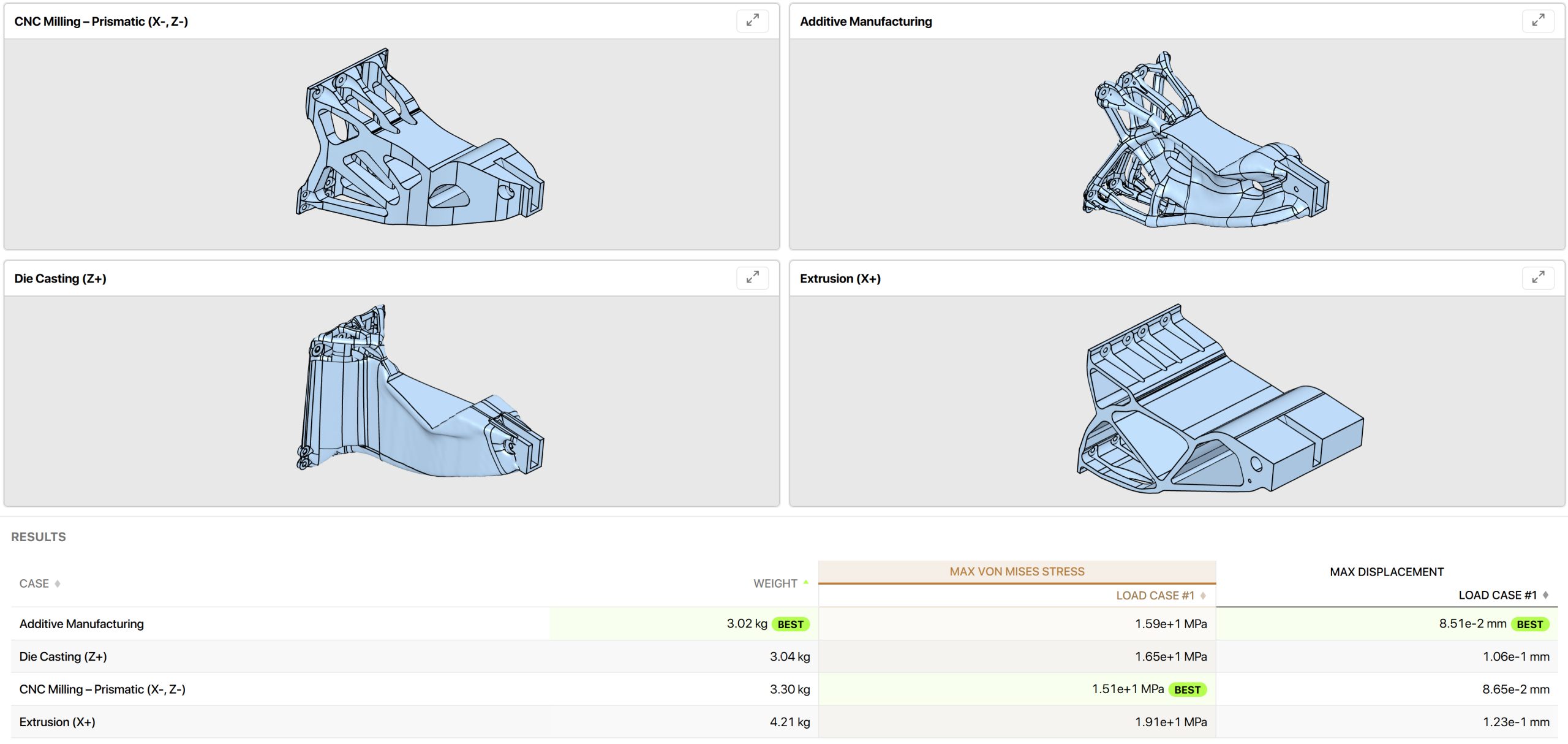
A few other improvements that come along with multi-case projects:
- Stacked thumbnails in the project cabinet show at a glance which cases have completed
- Per-case STEP downloads are collected under a single dropdown
- Per-case result reporting
The practical upshot: cast, milled, extruded, and additive versions of the same part now live side by side in one project, and the engineering tradeoffs between them are visible on a single screen instead of three browser tabs. For teams quoting parts across multiple processes, the time savings compound quickly.
Harmonic Excitation and Random Vibration Analysis (Beta)
Plenty of parts pass static FEA but fail in service because the loads they actually see are dynamic. This release introduces a new way of designing parts under complex dynamic loading conditions.
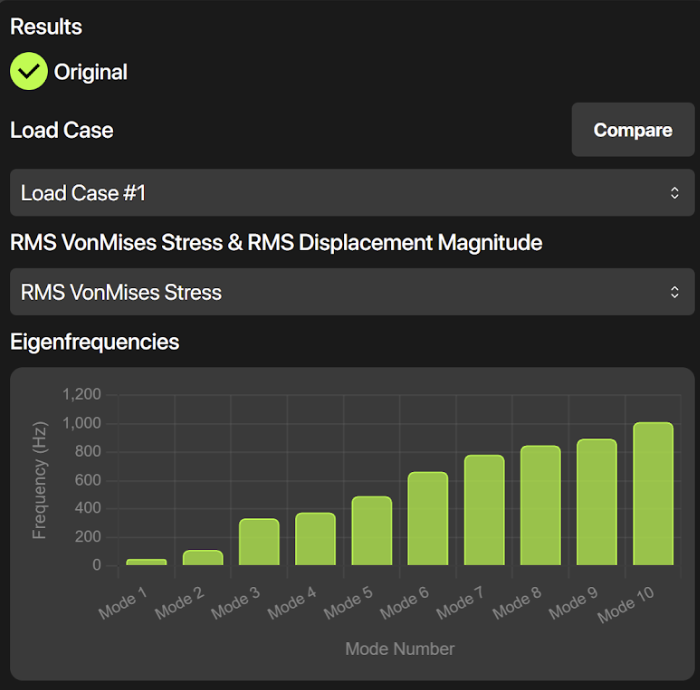
Harmonic Excitation (HE) applies sinusoidal loads across a frequency range. Use it to characterize how a structure responds at and around its resonant frequencies.
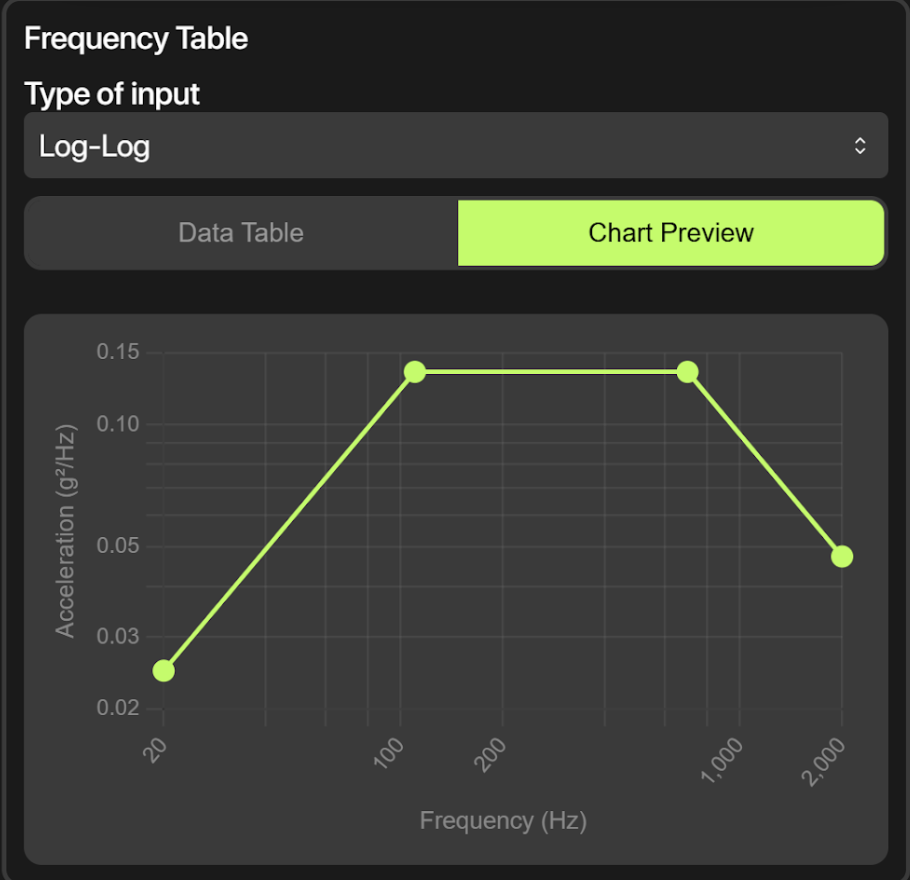
Random Vibration (RV) applies broadband statistical loading from a power spectral density profile. This is the load case you reach for when validating against shaker-table specs (MIL-STD-810, GMW3172, automotive PSD profiles, and so on).
Both load cases are configured through a dedicated base excitation UI that includes an interactive frequency chart and 3D base-part selection. If your design needs to survive aerospace, automotive, defense, or electronics-housing duty cycles, you can now build that requirement into the optimization itself instead of validating after the fact.
Soft Jaw Generation (Beta)
Once an optimized part lands at the CNC, it almost always needs custom soft jaws to be held safely. Designing those jaws by hand is tedious, easy to get wrong, and exactly the kind of work that should be automated.
Now it is. Upload any STEP or STL file and InfinitForm generates matched left and right soft jaws automatically. Configure relief settings and part orientation with a live 3D preview, then download the jaws as STEP files ready for machining.
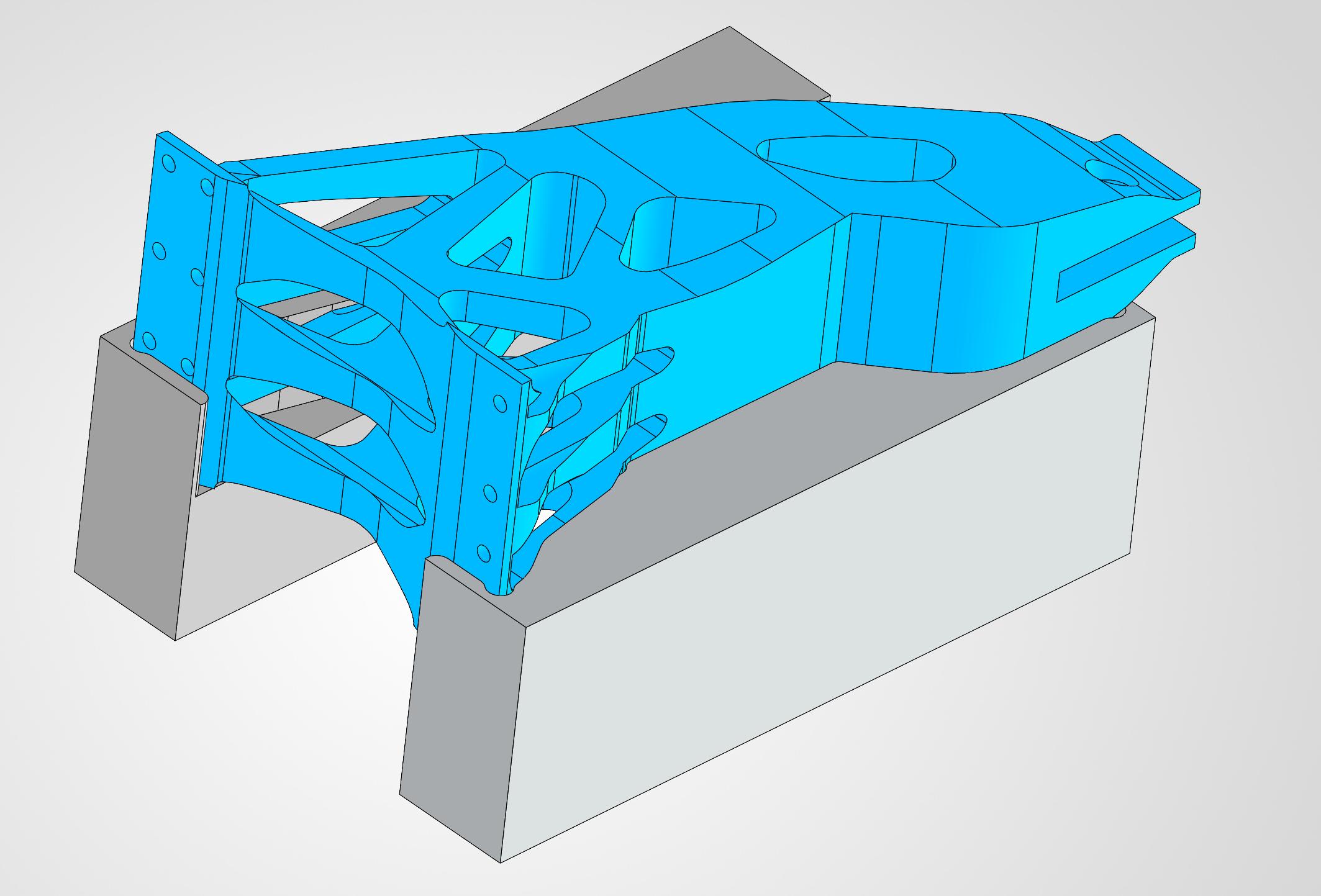
And you do not need to be using InfinitForm to design or optimize the part to take advantage of this. Bring in your existing designs, or pull in-process stock models out of your CAM software as STL, and InfinitForm will output prismatic soft jaws sized to your CNC milling workholding setup. It is a fast, standalone path to fixturing whether the part originated in InfinitForm or not.
Two notes worth flagging:
- Soft Jaw Generation works in both cloud and desktop workflows
- Generate soft jaws directly from your InfinitForm results, closing the loop between an optimized geometry and the fixturing needed to machine it
If you have ever lost a half-day in the machine shop because the soft jaws were not quite right, this one is for you.
Injection Molding (Beta)
Designing parts for injection molding is one of the most time-consuming jobs in plastics engineering. Optimizing rib structures and patterns, working out boss locations and connectivity, getting draft angles right across every face. It is a multi-day exercise that often loops back for revisions before a part is truly mold-ready.
InfinitForm now does all of it in about a minute.
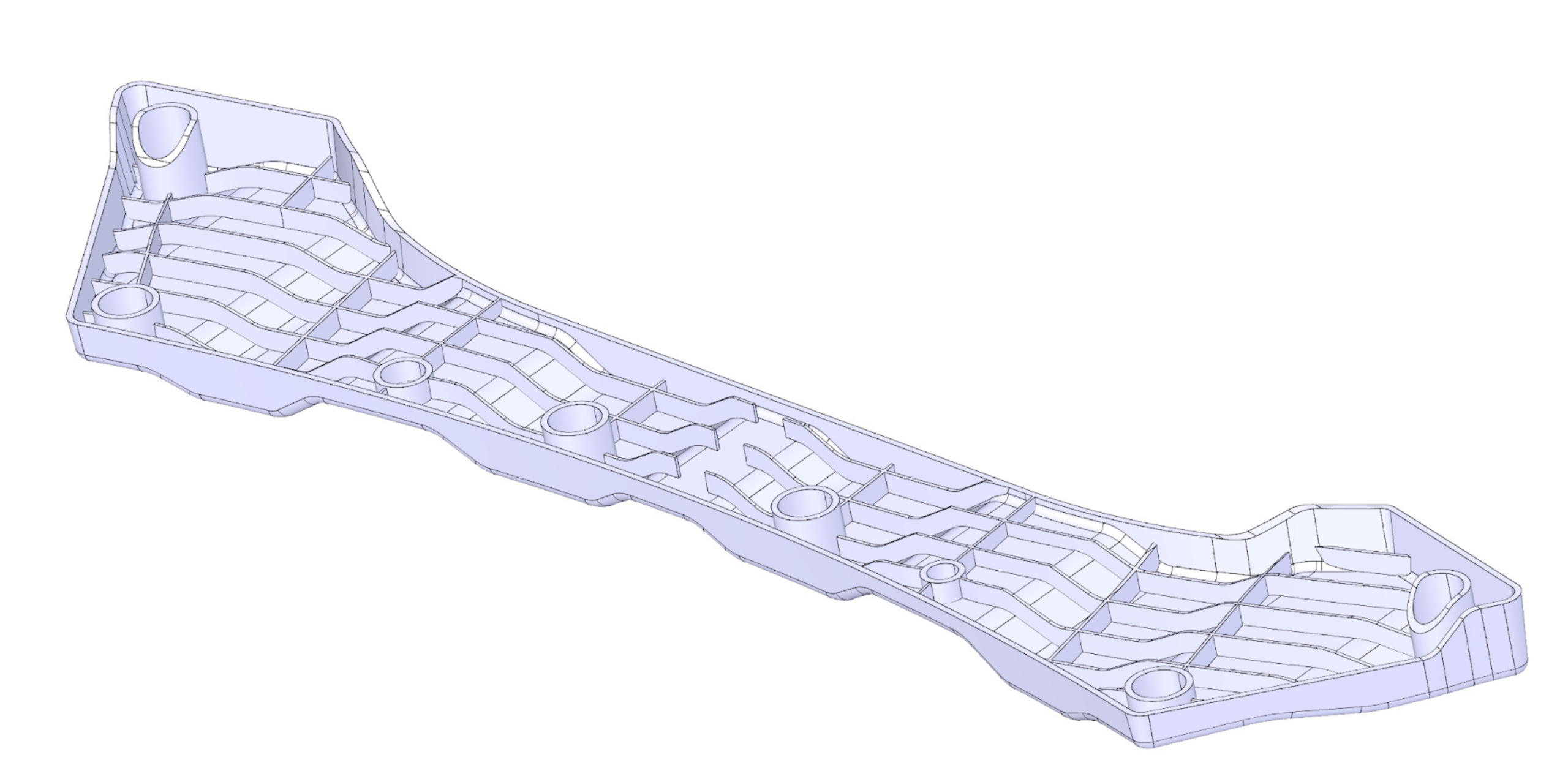
Define the mold opening direction using face-picking or vector input, with a 3D arrow visualization to confirm orientation. Configure rib guide curves, rib design domains, and boss placement. Hit go, and InfinitForm returns a mold-ready part as a STEP file, with rib structures, boss placement and connectivity, and draft angles already worked out.
For injection-molded parts, this collapses what is normally a multi-day handoff into something a design engineer can finish in the same session as the optimization.
A Substantially Smarter AI Copilot
The Copilot got a significant upgrade across nearly every dimension. Highlights:
Multi-turn memory. The Copilot now remembers your full conversation history. Ask follow-up questions, change your mind, come back tomorrow and pick up exactly where you left off.
End-to-end optimization guidance. Run a complete design optimization or FEA workflow conversationally. The Copilot walks you through goal definition, load case setup, materials, and solver configuration step by step.
Tutorial mode. Activates only when you explicitly ask for it ("walk me through this", "guide me"). Auto-configures goals and load case defaults, then runs a complete optimization without you setting every parameter manually. Useful for new users and for spinning up reference projects fast.
Auto-generate preserve geometry. Ask the Copilot to detect cylindrical holes in your design space and it will generate preserve cylinders for you, returned as a downloadable STEP file. An optional connectivity check confirms all bodies are properly joined after optimization.
HE/RV load case setup. The Copilot will configure the new Harmonic Excitation and Random Vibration analyses and walk you through the inputs.
Save materials to the library. Save a custom material to your library without leaving the chat.
PDF report generation. Request a detailed results report directly in chat and download it instantly. Multi-manufacturing projects now include a comparison table showing max stress and max displacement across all cases.
More accurate safety factor analysis. Results are only flagged as a concern when they indicate actual yield failure (SF below 1.0). No more false alarms on structurally sound designs.
Unit-aware. The Copilot understands and respects your project's unit system, metric or imperial.
Connectivity diagnostics. When a configuration issue is detected, the Copilot now explains what is wrong and walks you through the fix.
Taken together, the Copilot is moving from a helpful assistant for individual features to a workflow partner that can run a project end to end.
Materials Library: Save Your Own Materials
You can now save custom materials directly to your library for reuse across projects. The preset library has also been expanded with pricing data per kilogram. If your team works with proprietary alloys or supplier-specific stock, you no longer have to re-enter the same properties on every project.
Desktop App: Version 2.2.0
The desktop app picks up several reliability and quality-of-life improvements:
- Auto-update. The app now detects and installs updates automatically.
- License stability fix. Licenses no longer drop after sleep, wake, or hibernation. (Anyone who has lost a license mid-flight will appreciate this one.)
- Beta badges for Molding, Soft Jaws, and HE/RV so new features are easy to identify.
- Improved project type filtering in the cabinet.
UI/UX Polish
A handful of refinements that make day-to-day work smoother:
- Smooth animated modal open and close transitions throughout the app
- Redesigned project dropdown menus with a dedicated downloads submenu
- New side navigation processing overlay with a progress indicator during long operations
- Improved details drawer with support for all project types
- Cleaner permission labels and sharing restrictions on shared projects
Try It
Every feature in this release is live now in InfinitForm. If you are already a customer, open any project and you will see the new options. If you would like to take any of this for a spin, you can start a free trial.
Generative engineering for manufacturability. From the first iteration, all the way to the shop floor.